L10: Arrays & Lists
Excuse our mess while we finish this page! You can contribute here.
Overview
In this lesson, students will learn how computers store multiple values using lists (also called arrays in programming).
Instead of storing just one value in a variable, a list can store many values such as:
- words
- numbers
- names
- game items
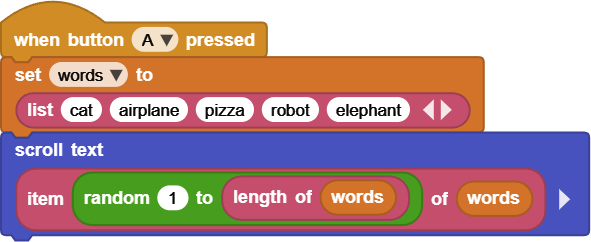
Students will use lists to build a simple Charades game, where a random word is selected and displayed.
They will also learn how to use a for loop to go through every item in a list.
Learning Goals
Students will:
- understand what a list (array) is
- create and use lists in MicroBlocks
- store multiple words in one list
- use random numbers to pick items
- build a simple Charades game
- use a
for each itemloop to iterate through a list
Time Required
45–60 minutes
Materials
- CincoBit or PixoBit
- USB cable
- Computer or Chromebook
- MicroBlocks
Teacher Notes
This lesson introduces one of the most important data structures in programming:
Lists
Students should understand:
- variables store single values
- lists store multiple values
- lists are used in games, apps, and real systems
- random selection is commonly used in games
This lesson also introduces:
- simple game logic
- iteration over collections
- basic randomness
What is a List?
A list is a collection of items stored together.
Instead of:
- word1 = “cat”
- word2 = “dog”
- word3 = “pizza”
We use one list:
["cat", "dog", "pizza"]
In programming, this is called:
a list
Why Use Lists?
Lists help programmers:
- organize data
- store multiple items
- simplify code
- build games and apps
Examples in real life:
- shopping lists
- contacts on a phone
- game inventories
- playlists in music apps
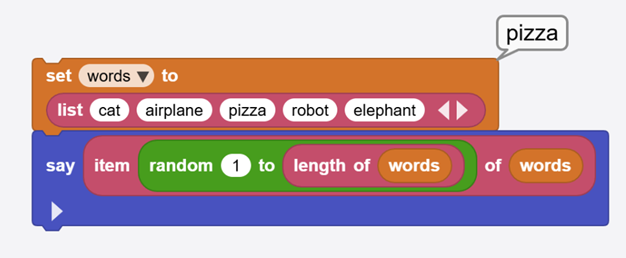
Step 1 - Create a word List
Just like how MicroBlocks variables can carry a value or a boolean, they can also carry a list.
The list is created from Data palette and then assigned to a variable.
We will create a new variable called words.

Step 2 - Random Word Selection
To build a Charades game, we randomly pick a word.
Steps:
- Get the length of the list
- Generate a random number
- Use that number to select a word
Example idea:
- random number between 1 and list length
Use length of block to check a list length. We now can generate a random number between 1 and the length of the list.
The item block returns one of the items in a list. Giving it 2 will result in item 2 in the list. Lists store items in order.
Example:
| Position | Word |
|---|---|
| 1 | cat |
| 2 | airplane |
| 3 | pizza |
| 4 | robot |
| 5 | elephant |
The position number is called an:
index
Programs use index numbers to access items.
This shows a random word each time. Click the block to run and see the results.
Step 3 - Charades Game
When the program runs:
- a random word appears
- student acts it out
- classmates guess it
Press button again to:
- generate a new word
This creates a simple interactive game.
Step 4 — Using a For Loop
A for each item loop allows us to go through every item in a list.
Example:
for each word in words
This means:
- take each item one at a time
- run the code for each item
What the Loop Does
For the list:
["cat", "airplane", "pizza"]
The loop runs like this:
- cat
- airplane
- pizza
Each item is processed one by one.
Step 5 — Display All Words
Use a loop to:
- show each word
- or scroll them on the display
- or play a sound for each item
Example behavior:
- “cat”
- wait
- “airplane”
- wait
- “pizza”
This helps students understand iteration over data.
Understanding Lists in Real Systems
Lists are used everywhere in computing:
Examples:
- music playlists
- contact lists
- game inventories
- web search results
- recommendation systems
Without lists, modern software would be extremely limited.
Try It
Can you:
- add more words to the list
- change the game category
- make words harder or easier
Real-World Connection
Lists (arrays) are one of the most important data structures in computing.
They are used in:
- apps
- games
- AI systems
- databases
- operating systems
Every modern software system uses lists in some form.
Troubleshooting
- Same word keeps appearing
- verify random range includes full list
- Words do not display
- check list format
- Loop does not run correctly
- verify list connection in for loop
Vocabulary
| Word | Meaning |
|---|---|
| List (Array) | Collection of items |
| Item | Single value inside a list |
| Index | Position in a list |
| Random | Unpredictable selection |
| Loop | Repeating structure |
| Iteration | Going through items one by one |
Wrap-Up Question
Why are lists important in games and apps?