L9: Boolean Logic
Excuse our mess while we finish this page! You can contribute here.
Overview
In previous lessons, students used if statements and comparisons to make decisions in programs.
In this lesson, students take that idea further by learning how computers combine multiple TRUE/FALSE conditions together using:
ANDORNOT
These operations are called:
Boolean logic
Students will create interactive programs that react to combinations of:
- buttons
- touch sensing
- light levels
- variables
using compound conditions.
Learning Goals
Students will:
- understand Boolean values
- use Boolean variables
- combine conditions with
AND - combine conditions with
OR - reverse conditions using
NOT - create programs using multiple conditions together
Time Required
45–60 minutes
Materials
- CincoBit or PixoBit
- USB cable
- Computer or Chromebook
- MicroBlocks
Teacher Notes
This lesson expands on the conditional logic introduced earlier in the course.
Students already learned:
if- comparisons
- TRUE/FALSE decisions
- random selection
in the Conditions and Decisions lesson.
This lesson focuses on:
combining multiple conditions together
using Boolean operators.
Review: Conditions
Programs often ask questions such as:
- Is the button pressed?
- Is the light level low?
- Is the score greater than 10?
These questions always return:
- TRUE or
- FALSE
You already used conditions earlier in the course. Now we will combine multiple conditions together.
What is Boolean Logic?
Boolean logic uses only two values:
| Value | Meaning |
|---|---|
| TRUE | Yes / On / Active |
| FALSE | No / Off / Inactive |
Computers constantly use Boolean values internally for:
- buttons
- switches
- sensors
- memory
- logic
Boolean Variables
Variables can store Boolean values. MicroBlocks automatically know what kind of value is being stored and then it sets the variable type internally. For example, we assigned numbers to variables. Now, we will set to boolean value.
MicroBlocks use a toggle switch to represent true and false.
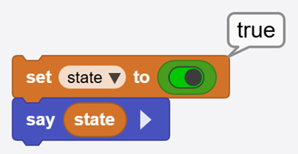
Students can use say to display:
- TRUE
- FALSE
and observe how the value changes while the program runs.
Comparison Operators
Programs compare values using comparison operators.
| Operator | Meaning |
|---|---|
= | equal to |
> | greater than |
< | less than |
Those work with numbers and result with a boolean.
Examples:
| Expression | Result |
|---|---|
score > 10 | TRUE if score is larger than 10 |
temperature < 20 | TRUE if temperature is below 20 |
count = 5 | TRUE only when count equals 5 |
But you can't use > with a boolean. Think about it, how can true be > true?
Using = makes sense
Boolean Operators
There are operators that are made for boolean values. The first one is not. This results in the opposite result of a variable. Like when you say "if a pin is touched" vs "if the pin is not touched"
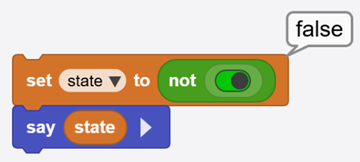
The and operator requires:
BOTH conditions must be TRUE
Examples:
| Condition A | Condition B | Result |
|---|---|---|
| TRUE | TRUE | TRUE |
| TRUE | FALSE | FALSE |
| FALSE | TRUE | FALSE |
| FALSE | FALSE | FALSE |
This is useful when having multiple conditions for something to happen.
When a button is pressed and lives (game lives) is less than 1 then game over. Both of these conditions must be met for a "game over"
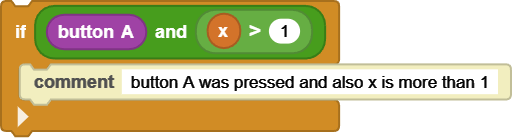
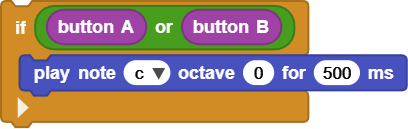
The or operator requires:
ONLY ONE condition must be TRUE
Examples:
| Condition A | Condition B | Result |
|---|---|---|
| TRUE | TRUE | TRUE |
| TRUE | FALSE | TRUE |
| FALSE | TRUE | TRUE |
| FALSE | FALSE | FALSE |
Example:
If button A is pressed or button B is pressed then play a tone.
Activity 1 - Two Button Unlock
Create a simple unlock system.
Requirements:
- both buttons must be pressed
- display a happy face
- play a sound
Use:
AND- button conditions
- display blocks
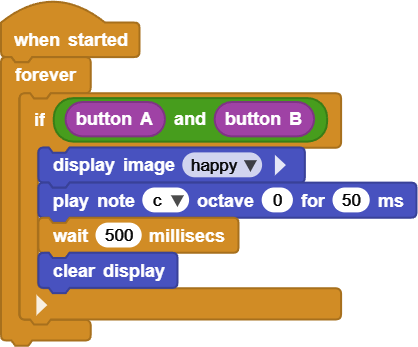
Students will create a program that only activates when BOTH buttons are pressed.
Activity 2 - Alarm Trigger
Create a simple alarm.
Requirements:
- if either button is pressed
- display warning icon
- play sound
Use:
OR- display images
- buzzer sounds
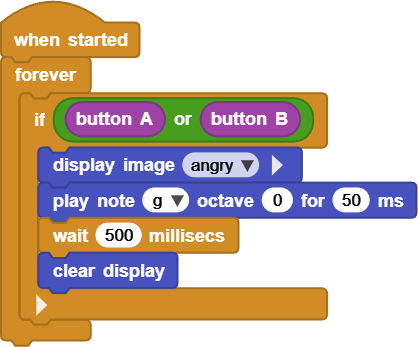
Students compare how OR behaves differently from AND.
Activity 3 - Touch and Lights Logic
Combine multiple conditions together.
Example ideas:
- sound alarm if touched AND room is dark
- activate warning if touched OR button pressed
Students begin combining:
- sensors
- variables
- conditions
- Boolean operators
into larger programs.
We will use due light level to check the light level. Use your hand to cover the board to make it see the room as "dark". The light sensor goes from low numbers, like 100 when dark to close to 1000 when very bright.
If the room is dark and button B is detected then show a skull on the screen or 500ms!
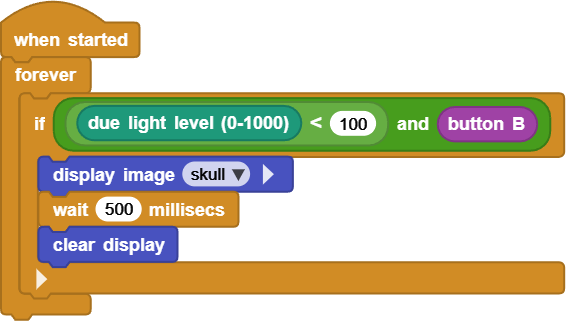
Compound Conditions
Programs often need:
- multiple requirements
- backup conditions
- safety checks
Compound conditions allow programs to make smarter decisions.
Examples in real systems:
- security systems
- robots
- smart homes
- cars
- appliances
Real-World Connection
Boolean logic is used in:
- computers
- electronics
- robots
- traffic lights
- elevators
- appliances
- industrial systems
Every modern digital device relies on Boolean operations internally.
Try It
Can you:
- combine 3 conditions together
- create smarter alarms
- build a mini security system
- reverse conditions using
NOT
Challenge
Create:
- a smart alarm
- a touch-based security system
- a multi-condition game
- a sensor-controlled warning system
using Boolean logic.
Troubleshooting
- Condition never becomes TRUE
- verify logic blocks are connected properly
- Wrong result displayed
- check comparisons carefully
- Sound or display does not activate
- verify the condition block controls the correct code
Vocabulary
| Word | Meaning |
|---|---|
| Boolean | TRUE or FALSE value |
| Compound Condition | Multiple conditions combined together |
| AND | Both conditions must be TRUE |
| OR | Either condition can be TRUE |
| NOT | Reverses a condition |
| Comparison | Checking values |
Wrap-Up Question
Why might a program need more than one condition before taking action?