CincoBit CS Curriculum
Excuse our mess while we finish this page! You can contribute here.
The CincoBit curriculum introduces students to coding, creativity, and physical computing using simple hands-on projects and interactive activities. Designed for students 9 years to adult!
This curriculum is designed as an introductory computer science program for middle school students, typically grades 6-8. It is also structured to support educators who are new to teaching programming or computer science concepts.
The lessons introduce core programming and computational thinking topics through interactive projects using CincoBit, or PixoBit. Students learn MicroBlocks coding by building animations, games, sound effects, logic systems, and simple interactive applications while gradually developing problem-solving and coding skills.
The course is flexible and can be adapted to different classroom schedules. Most lessons are designed to fit within a single week of instruction, while larger projects or creative activities may span multiple class sessions. Teachers are encouraged to adjust pacing, lesson depth, and project complexity based on student experience level, available classroom time, and school resources.

CincoBit includes:
- a 5x5 LED matrix display
- a light sensor
- temperature sensing
- 2 buttons
- a built-in buzzer for sound and music
- expansion pads that are touch sensitive
Using these features, students can create animations, games, instruments, interactive displays, and sensor-based projects while learning real programming concepts.
The curriculum is designed for:
- classrooms
- STEM programs
- makerspaces
- after-school clubs
- beginner coding courses
Lessons are beginner-friendly, require minimal setup, and are designed to work well in a single class period.
Programming Options
CincoBit supports multiple programming languages and environments. This curriculum benefits from block-coding using MicroBlocks, as it provides immediate visual feedback and an easy drag-and-drop coding experience. There is no installation as it runs right from an internet browser.
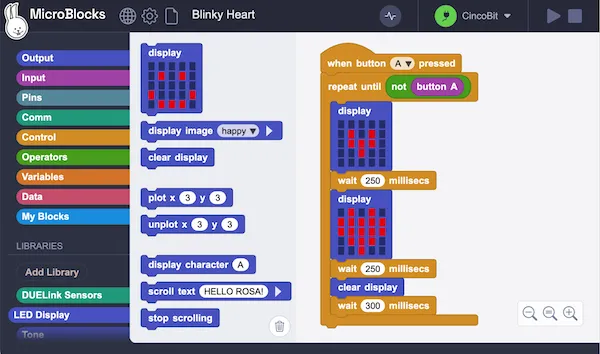
The block images found in the curriculum can be dragged right into the MicroBlocks website.
More advanced students can go beyond this curriculum and program CincoBit using Python, JavaScript, and other languages. If using Python, CincoBit connects directly to a PC using USB. Visit the Getting Started page to learn how to blink the STAT LED using Python. From there, the Tethered Sample Python tab on CincoBit Product page includes a complete working sample to help get you started.
PC Tethered Python Sample (click for code!)
loading...
But as explained, this curriculum uses MicroBlocks.
Compatible Hardware
Lessons in this curriculum are also compatible with PixoBit.

PixoBit uses the same programming concepts and software environment. Lessons that use the CincoBit 5x5 LED matrix will also work on PixoBit's graphical display as is. PixoBit simulates the 5x5 LED matrix on its graphical display, and also has graphing facilities available for the user when they are ready.
This allows students and classrooms to transition between boards while continuing to build on the same coding skills and project ideas.
Lessons
L1: Boardie - Virtual Device
Learn how to use Boardie, the virtual device included with MicroBlocks. Students explore live programming by creating LED graphics, simple animations, and musical notes without needing physical hardware. This lesson introduces the LED Display and Tone libraries while providing a simple way to begin learning both in the classroom and at home.
L2: First Pixels
Connect CincoBit or PixoBit to MicroBlocks and create your first interactive programs using the LED display. Students learn how live programming works while experimenting with pixels, images, scrolling text, and real-time updates directly on the device.
L3: Algorithms & Events
Learn how programs follow a sequence of instructions using the input-process-output model. Students use button press events to trigger actions on the display while also learning how comments help explain and organize code.
L4: Variables & Math
Learn how programs store and change information using variables. Students count button presses, update values with math operations, and display changing results while building interactive programs with events and variables.
L5: Conditions & Decisions
Learn how programs make decisions using if statements and comparison operators. Students use random numbers to create interactive projects such as a Rock-Paper-Scissors game while exploring TRUE and FALSE conditions.
L6: Iteration & Loops
Learn how computers repeat actions using loops. Students use repeat, repeat-until, and forever loops to create sound patterns, animations, and timed behaviors while learning how delays and milliseconds control program timing.
L7: Review Project - Hearing Test
Review key concepts from previous lessons by building a hearing range tester. Students use loops, variables, and sound generation to sweep through frequencies and determine the highest tone a user can hear, displaying results on the device.
L8: Coordinates grid
Learn how screen positions are defined using X and Y coordinates. Students use plot and unplot blocks to control individual pixels and create movement by tracking position with variables and buttons. On PixoBit, they extend this idea to use a graphical display.
L9: Boolean variables
Learn how computers make decisions using TRUE and FALSE values. Students explore Boolean variables, comparison operators, and logical conditions using AND/OR to build interactive programs that respond to buttons, touch, and sensor input.
L10: Arrays
Learn how to store multiple values in a single structure called a list (array in programming). Students build a simple Charades game by creating a list of words, then use random selection and loops to display and cycle through items in the list.
L11: Functions & Blocks
Learn how to create custom blocks in MicroBlocks to organize and reuse code. Students build a frequency sweep program, then simplify it into a single reusable block with optional inputs (arguments), while learning how functions help keep programs clean and easy to understand.
L12: Video Games
Build a simple video game where players move a shield using buttons to protect Earth from falling meteors. Students combine coordinates, movement, conditions, loops, variables, and collision detection to create an interactive game.
Standards alignment (CSTA K-12)
This curriculum aligns to the CSTA K-12 Computer Science Standards. It is designed primarily for middle school (grades 6–8). It can also support an introductory high school course (grades 9–10), such as first-year CS, physical computing, or a makers elective. It is not intended as a complete grades 11–12 or AP-level course without additional units in text-based programming, data structures, and systems.
| Lesson | Title | Middle school (6–8) | High school intro (9–10) |
|---|---|---|---|
| L1 | Boardie – Virtual Device | 2-CS-01, 2-CS-02, 2-AP-10, 2-AP-12 | 3A-CS-01, 3A-CS-02, 3A-AP-16 |
| L2 | First Pixel | 2-CS-01, 2-CS-02, 2-CS-03, 2-AP-12 | 3A-CS-01, 3A-CS-03, 3A-AP-23 |
| L3 | Algorithms & Events | 2-AP-01, 2-AP-05, 2-AP-06, 2-AP-10 | 3A-AP-01, 3A-AP-13, 3A-AP-16 |
| L4 | Variables & Math | 2-AP-02, 2-AP-08, 2-AP-11, 2-DA-07 | 3A-AP-02, 3A-AP-14, 3A-DA-08 |
| L5 | Conditions & Decisions | 2-AP-05, 2-AP-08, 2-AP-12 | 3A-AP-05, 3A-AP-14, 3A-AP-23 |
| L6 | Iteration & Loops | 2-AP-05, 2-AP-08, 2-CS-02, 2-CS-03 | 3A-AP-05, 3A-AP-14, 3A-CS-02 |
| L7 | Review Project – Hearing Test | 2-AP-02, 2-AP-05, 2-AP-06, 2-AP-07, 2-CS-02, 2-DA-07, 2-AP-12 | 3A-AP-02, 3A-AP-05, 3A-AP-18, 3A-CS-02 |
| L8 | Coordinates | 2-AP-02, 2-AP-05, 2-AP-06, 2-AP-11 | 3A-AP-02, 3A-AP-05, 3A-AP-18 |
| L9 | Boolean Logic | 2-AP-05, 2-AP-08, 2-CS-02 | 3A-AP-05, 3A-AP-14 |
| L10 | Arrays & Lists | 2-AP-02, 2-AP-05, 2-DA-07, 2-DA-08 | 3A-AP-02, 3A-AP-05, 3A-DA-08 |
| L11 | Functions & Blocks | 2-AP-04, 2-AP-07, 2-AP-11 | 3A-AP-04, 3A-AP-18, 3A-AP-16 |
| L12 | Video Games | 2-AP-05, 2-AP-06, 2-AP-07, 2-IC-20 | 3A-AP-05, 3A-AP-18, 3A-IC-24 |
CSTA uses the 2- prefix for grades 6–8 and the 3A- prefix for grades 9–10. Confirm exact performance expectations on the CSTA standards site for your adoption year.
Middle school standard codes (grades 6–8)
| Code | Concept | Description |
|---|---|---|
| 2-CS-01 | Computing Systems | Recommend devices, tools, and languages for a task |
| 2-CS-02 | Computing Systems | Combine hardware and software in project designs |
| 2-CS-03 | Computing Systems | Systematically identify and fix problems |
| 2-AP-01 | Algorithms & Programming | Represent algorithms using steps and flow |
| 2-AP-02 | Algorithms & Programming | Use variables to represent data and state |
| 2-AP-04 | Algorithms & Programming | Develop procedures with parameters |
| 2-AP-05 | Algorithms & Programming | Use conditionals, loops, and operators |
| 2-AP-06 | Algorithms & Programming | Develop programs to solve problems |
| 2-AP-07 | Algorithms & Programming | Design programs using a modular approach |
| 2-AP-08 | Algorithms & Programming | Use operators in programs |
| 2-AP-10 | Algorithms & Programming | Document programs for others |
| 2-AP-11 | Algorithms & Programming | Use meaningful names and organization |
| 2-AP-12 | Algorithms & Programming | Debug and fix errors |
| 2-DA-07 | Data & Analysis | Represent data visually |
| 2-DA-08 | Data & Analysis | Collect and transform data for use |
| 2-IC-20 | Impacts of Computing | Use technology responsibly and appropriately |
High school intro standard codes (grades 9–10)
| Code | Concept | Description |
|---|---|---|
| 3A-CS-01 | Computing Systems | Recommend tools and languages for a task |
| 3A-CS-02 | Computing Systems | Combine hardware and software components |
| 3A-CS-03 | Computing Systems | Troubleshoot and fix problems |
| 3A-AP-01 | Algorithms & Programming | Represent algorithms using flowcharts and pseudocode |
| 3A-AP-02 | Algorithms & Programming | Use variables; represent data with lists and keys |
| 3A-AP-04 | Algorithms & Programming | Develop procedures with parameters |
| 3A-AP-05 | Algorithms & Programming | Use flow control (conditionals, loops, operators) |
| 3A-AP-13 | Algorithms & Programming | Document programs for others |
| 3A-AP-14 | Algorithms & Programming | Use operators and expressions |
| 3A-AP-16 | Algorithms & Programming | Apply CS terms in written and oral communication |
| 3A-AP-18 | Algorithms & Programming | Create artifacts using modular design |
| 3A-AP-23 | Algorithms & Programming | Debug and fix errors |
| 3A-DA-08 | Data & Analysis | Transform data to make it useful |
| 3A-IC-24 | Impacts of Computing | Evaluate the social impacts of technology |
Acknowledgment
Special thanks to Douglas Kiang and Mary Kiang for inspiration on curriculum pacing and introductory computer science lesson sequencing.
Additional thanks to John Maloney and the entire MicroBlocks team for their support, testing, porting efforts, and collaboration in helping bring MicroBlocks to the DUELink ecosystem.